1.1 、让centos下载软件更快
阿里云镜像站:https://developer.aliyun.com/mirror/
使用阿里云yum源:
wget -O /etc/yum.repos.d/epel.repo https://mirrors.aliyun.com/repo/epel-7.repo
curl -o /etc/yum.repos.d/CentOS-Base.repo https://mirrors.aliyun.com/repo/Centos-7.repo
1.2 安装常用工具
常用工具:telnet、tree、vim 、 sl 、 cowsay 、 vim、 wget 、 bash-completion、bash-completion-extras、lrzsz、net-tools、sysstat、iotop、iftop、htop、unzip、nc、nmap、telnet、bc、psmisc、httpd-tools、bind-utils、nethogs、expect
bash-completion bash-completion-extras:命令、参数补全。按Tab键
2、命令补充
2.1 echo命令
Linux如何修改文件内容:vi、vim,编辑文件交互式。操作流程较长。
案例1:创建文件/test/test.txt文件,并写入“haha”内容
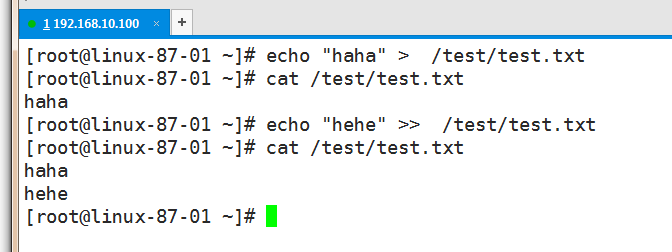
> :重定向,先清空,然后写入。
>> :追加重定向,不清空文件,把内容写入文件末尾。案例2:输出有规律的内容,比如1 2 3 4。。。。,写入/test/a.txt
[root@linux-87-01 ~]# echo {1..10} > /test/a.txt
[root@linux-87-01 ~]# cat /test/a.txt
1 2 3 4 5 6 7 8 9 10
[root@linux-87-01 ~]#
{}:用于生成序列。如:{1..10} {01..100} {a..z}
echo + 重定向:1、输出内容。2、使用>和>>输出写入文件。3、使用{}生成有规律的内容
案例3:在/test/目录中创建10个文件,文件名分别为01.txt …. 10.txt
[root@linux-87-01 ~]# touch /test/{01..10}.txt2.2 tree命令
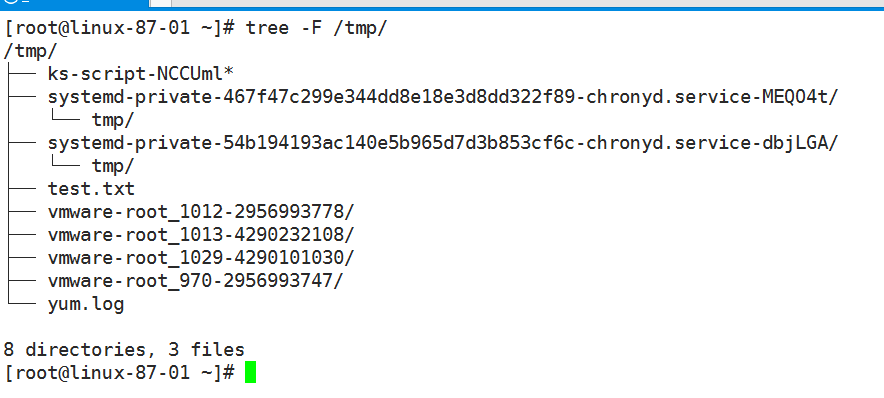
tree:查看目录结构
默认没有安装tree命令,可以使用:yum install -y tree 命令安装tree
选项:-F 目录会加/作为标识例如: