1、varnish安装【rhel7.0】
[root@node1 ~]# yum install varnish -y
2、配置文件varnish.params
[root@node1 ~]# cd /etc/varnish/
[root@node1 varnish]# ls
default.vcl secret varnish.params
[root@node1 varnish]#vim varnish.params
# Set this to 1 to make systemd reload try to switch VCL without restart.
RELOAD_VCL=1
# Main configuration file. You probably want to change it.
VARNISH_VCL_CONF=/etc/varnish/default.vcl
# Default address and port to bind to. Blank address means all IPv4
# and IPv6 interfaces, otherwise specify a host name, an IPv4 dotted
# quad, or an IPv6 address in brackets.
# VARNISH_LISTEN_ADDRESS=192.168.1.5
VARNISH_LISTEN_PORT=6081
# Admin interface listen address and port
# Varnish environment configuration description. This was derived from
# the old style sysconfig/defaults settings
# Set this to 1 to make systemd reload try to switch VCL without restart.
RELOAD_VCL=1
# Main configuration file. You probably want to change it.
VARNISH_VCL_CONF=/etc/varnish/default.vcl
# Default address and port to bind to. Blank address means all IPv4
# and IPv6 interfaces, otherwise specify a host name, an IPv4 dotted
# quad, or an IPv6 address in brackets.
# VARNISH_LISTEN_ADDRESS=192.168.1.5
VARNISH_LISTEN_PORT=6081
# Admin interface listen address and port
# VARNISH_LISTEN_ADDRESS=192.168.1.5
VARNISH_LISTEN_PORT=6081
# Admin interface listen address and port
VARNISH_ADMIN_LISTEN_ADDRESS=127.0.0.1
VARNISH_ADMIN_LISTEN_PORT=6082
# Shared secret file for admin interface
VARNISH_SECRET_FILE=/etc/varnish/secret
# Backend storage specification, see Storage Types in the varnishd(5)
# man page for details.
#VARNISH_STORAGE="file,/var/lib/varnish/varnish_storage.bin,1G"
VARNISH_STORAGE="malloc,256M"
VARNISH_TTL=120
# User and group for the varnishd worker processes
VARNISH_USER=varnish
VARNISH_GROUP=varnish
# Other options, see the man page varnishd(1)
#DAEMON_OPTS="-p thread_pool_min=5 -p thread_pool_max=500 -p thread_pool_timeout=300"
[root@node1 varnish]# vim default.vcl
2、客户端ip:192.168.10.202【rhel7.3】,新建10个测试页,web服务用nginx
for i in {1..10};do echo "Page $i on 192.168.10.202" > /usr/share/nginx/html/test$i.html;done
3、修改配置文件default.vcl
backend default {
.host = "192.168.10.202";
.port = "80";
}
4、启动varnish服务
[root@node1 varnish]# systemctl start varnish
端口监听在6081、6082
服务端、客服端关闭防火墙。
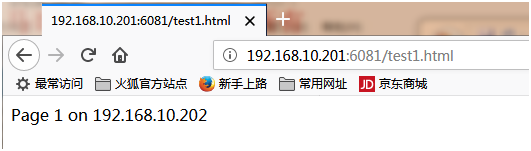
浏览器打开:http://192.168.10.201:6081/test1.html
管理工具:varnishadm
[root@node1 varnish]# varnishadm -S /etc/varnish/secret -T 127.0.0.1:6082
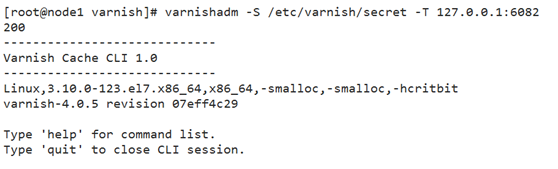
vcl.load test default.vcl
200
VCL compiled.
vcl.list
200
active 0 boot
available 0 test
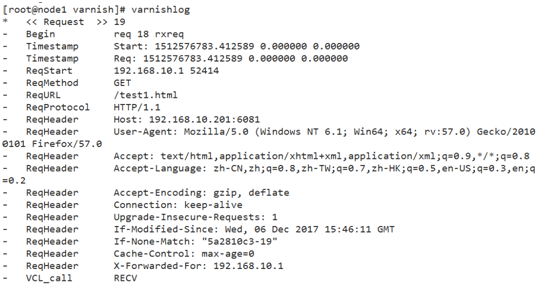
日志命令:[root@node1 varnish]# varnishlog
刷新网页:http://192.168.10.201:6081/test1.html
[root@node1 varnish]# varnishncsa