服务端: ip 192.168.10.201 RHEL 7.0
客户端1:ip 192.168.10.202 RHEL 7.3
客户端2:ip 192.168.10.203 RHEL 7.3
客户端3:ip 192.168.10.204 CentOS 6.8
一、服务端安装配置:ip 192.168.10.201 RHEL 7.0
1、安装ansible
[root@node1 ~]# yum install ansible -y
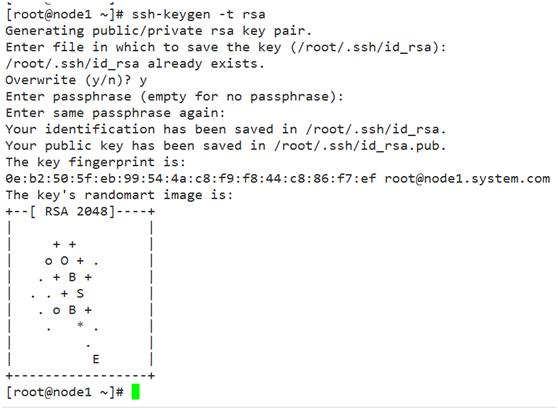
2、生成密钥
[root@node1 ~]# ssh-keygen -t rsa
3、将公钥发给客户端(服务端自己管理自己)
[root@node1 ~]# ssh-copy-id -i ~/.ssh/id_rsa.pub root@192.168.10.201
[root@node1 ~]# ssh-copy-id -i ~/.ssh/id_rsa.pub root@192.168.10.202
[root@node1 ~]# ssh-copy-id -i ~/.ssh/id_rsa.pub root@192.168.10.203
[root@node1 ~]# ssh-copy-id -i ~/.ssh/id_rsa.pub root@192.168.10.204
测试无须密码认证:
[root@node1 ansible]# for i in 201 202 203 204;do ssh 192.168.10.$i 'date';done

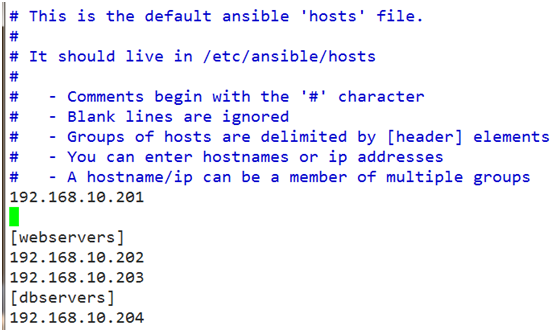
4、定义被管理的主机清单:vim /etc/ansible/hosts
192.168.10.201
[webservers]
192.168.10.202
192.168.10.203
[dbservers]
192.168.10.204
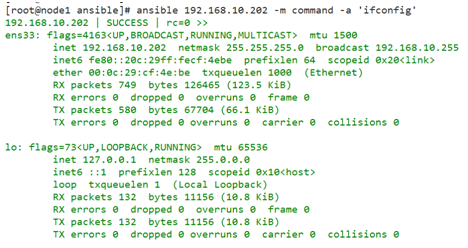
5、测试command模块:
运行:ansible 192.168.10.202 -m command -a 'ifconfig'
测试全部
[root@node1 ansible]# ansible all -m command -a 'ifconfig'
或者:[root@node1 ansible]# ansible all -a 'ifconfig'
二、常用模块介绍
ansible <host-patten> [ -f forks] [ -m modlue_name] [ -a args]
args: key=value
1、默认模块:command,不需使用key=value格式
-a 'COMMAND'
2、user:用户管理模块
-a 'name= state={present|absent} system= uid= '
创建用户:
[root@node1 ~]# ansible webservers -m user -a 'name=hacluster state=present'
删除用户:
[root@node1 ~]# ansible webservers -m user -a 'name=hacluster state=absent'
但家目录不会删除
3、group模块
-a 'name= gid= state= system= '
4、cron模块
-a 'name= minute= hour= day= month= weekday= job= user= state= '
[root@node1 ~]# ansible all -m cron -a "name='sync time from ntpserver' minute='*/10' job='/sbin/ntpdate 192.168.10.2 &> /dev/null'"
5、copy模块
-a 'dest= src= mode= owner= group= '
[root@node1 ~]# ansible all -m copy -a 'src=/etc/fstab dest=/root/fstab mode=600'
7、file模块
-a 'path= state= force=yes'
创建目录:
[root@node1 ~]# ansible all -m file -a 'path=/test state=directory'
删除目录:
[root@node1 ~]# ansible all -m file -a 'path=/test state=absent'
创建连接:在/test目录下创建一个链接文件
第1步:ansible all -m file -a 'path=/test state=directory'
第2步:ansible all -m file -a 'path=/test/fstab.link src=/etc/fstab state=link'

8、ping模块:没有参数
9、yum模块
[root@node1 ~]# ansible all -m yum -a 'name=nginx state=latest'
10、service模块
-a 'name= state=started|stopped|restarted enabled='
ansible webservers -m service -a 'name=nginx state=startd enabled=yes'
11、shell模块
# ansible all -m shell -a 'echo 12345 | passwd –stdin root'
12、sript模块
[root@node1 ~]# vim /tmp/test.sh
#!/bin/bash
echo "ansible">/root/test.txt
[root@node1 ~]# ansible all -m script -a '/tmp/test.sh'
13、setup模块
[root@node1 ~]# ansible all -m setup