为了测试方便,所有机子清空或关闭防火墙
test1:192.168.10.161,提供NFS服务(CentOS 6.8),主机名:test1
test2:192.168.10.162,提供http服务(CentOS 6.9),主机名:test2
test3:192.168.10.163,提供http服务(CentOS 6.9),主机名:test3
vip:192.168.10.10
设置test1、test2、test3能基于主机名通信,在/etc/hosts中添加:
192.168.10.161 test1
192.168.10.162 test2
192.168.10.163 test3
配置HA集群的前提:
1、节点时间同步,可以使用ntp协议实现
test1、test2、test3安装ntp。
test1启动ntpd服务,test2、test3运行:
ntpdate 192.168.10.161
2、节点间通过主机名通讯,必须解析主机名到ip地址
3、考虑是否需要仲裁设备
4、各节点间root用户能够基于密钥认证
test1、test2、test3之间root用户基于密钥认证设置过程、时间同步设置过程略。
注意:定义成为集群服务中的资源不能开机启动。
一、test1安装nfs,共享目录:/etc/htdocs
安装nfs:
#yum install nfs-utils -y
#mdkir /nfs/htdocs -p
测试页:
[root@test1 ~]# echo "<h1>Test On NFS Server</h1>" >/nfs/htdocs/index.html
编辑/etc/exports 文件
# [root@test1 ~]# vim /etc/exports
/nfs/htdocs *(rw,no_root_squash)
二、test2、test3安装httpd服务
# yum install httpd -y
安装完之后不用启动httpd服务
设置httpd不能开机启动:
# chkconfig httpd off
三、test2、test3设置SELinux
# setsebool -P httpd_use_nfs 1
四、heartbeat V2版的安装
test2、test3节点安装heartbeat V2版本
下载地址:https://pan.baidu.com/s/1i5QYj8T
1、安装依赖包
# yum install net-snmp-libs libnet PyXML perl-TimeDate -y
#yum groupinstall "Debugging Tools" "Server Platform Development" -y
2、test2、test3节点安装
heartbeat-2.1.4-12.el6.x86_64.rpm heartbeat-pils-2.1.4-12.el6.x86_64.rpm
heartbeat-devel-2.1.4-12.el6.x86_64.rpm heartbeat-stonith-2.1.4-12.el6.x86_64.rpm
heartbeat-gui-2.1.4-12.el6.x86_64.rpm
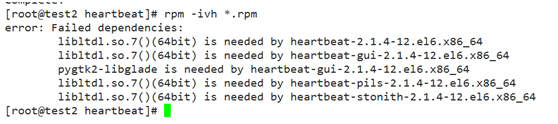
[root@test2 heartbeat]# yum install libltdl* pygtk2-libglade* -y
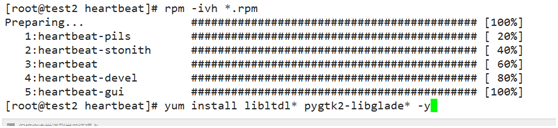
3、在test2节点上配置heartbeat
1)复制/usr/share/doc/heartbeat-2.1.4/目录下相关配置文件到/etc/ha.d目录下
[root@test2 ha.d]# cp /usr/share/doc/heartbeat-2.1.4/{authkeys,ha.cf,haresources} /etc/ha.d/
2)配置ha.cf,vim /etc/ha.cf
启动日志:logfile /var/log/ha-log
设置多播:mcast eth0 225.10.0.1 694 1 0
定义节点:
node test2
node test3
定义仲裁:ping 192.168.10.2(这里为网关ip)
3)配置资源,vim /etc/ha.d/haresource
test2 192.168.10.10/24/eth0/192.168.10.255 Filesystem::192.168.10.161:/nfs/htdocs::/var/www/html::nfs httpd

4)配置authkeys
生成一个随机字符串作为认证密钥:
[root@test3 ha.d]# openssl rand -base64 8
i80T7YUjfe4=
[root@test2 ha.d]# vim authkeys
auth 2
2 sha1 i80T7YUjfe4=
authkeys文件权限为600, [root@test2 ha.d]# chmod 600 authkeys
5)将authkeys 、ha.cf 、haresources配置文件发给test3
scp -p authkeys ha.cf haresources test3:/etc/ha.d/
6)启动heartbeat服务:
[root@test2 ha.d]# service heartbeat start;ssh test3 'service heartbeat start'
浏览器打开:192.168.10.10
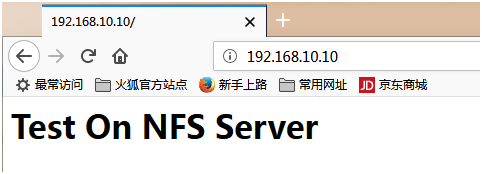
OK。。。
节点下线命令:/usr/lib64/heartbeat/hb_standby
节点夺取资源命令:/usr/lib64/heartbeat/hb_takeover