192.168.10.162 CentOS6.9 主机名:test2
192.168.10.163 CentOS6.9 主机名:test3
ha web service
webip:192.168.10.23
配置两节点的corosync/pacemaker集群,设置两个全局属性:
stonith-enabled=false
no-quorum-policy=ignore
test2、test3已安装httpd(服务无需事先启动)
test2测试页: Test Page:test2…
test3测试页: Test Page:test3…
httpd无需开机启动
一、test2、test3安装corosync+pacemaker
# yum install corosync pacemaker -y
二、配置corosync
2.1、配置corosync.conf文件
[root@test2 ~]# cd /etc/corosync/
[root@test2 corosync]# cp corosync.conf.example corosync.conf

[root@test2 corosync]# vim corosync.conf
compatibility: whitetank
totem {
version: 2
secauth: on
threads: 0
interface {
ringnumber: 0
bindnetaddr: 192.168.10.0
mcastaddr: 239.255.1.91
mcastport: 5405
ttl: 1
}
}
logging {
fileline: off
to_stderr: no
to_logfile: yes
logfile: /var/log/cluster/corosync.log
to_syslog: no
debug: off
timestamp: on
logger_subsys {
subsys: AMF
debug: off
}
}
#pacemaker以插件的形式使用
service {
ver: 0
name: pacemaker
use_mgmtd: yes
}
aisexec {
user: root
group: root
}
2.2、生成密钥
[root@test2 corosync]# corosync-keygen
生成的文件为:authkey
3.3、将corosync.conf、authkey发给test3节点
[root@test2 corosync]# scp -p corosync.conf authkey test3:/etc/corosync/
3.4、test2、test3节点启动corosync服务
[root@test2 corosync]# service corosync start;ssh test3 'service corosync
查看corosync引擎是否正常启动:
grep -e "Corosync Cluster Engine" -e "configuration file" /var/log/cluster/corosync.log

查看初始化成员节点通知是否正常发出:
[root@test2 ~]# grep TOTEM /var/log/cluster/corosync.log
三、crmsh安装(test2、test3都可以安装)
crmsh-1.2.6-0.rc2.2.1.x86_64.rpm
pssh-2.0-1.el6.rf.noarch.rpm
下载地址:
http://rpm.pbone.net/index.php3/stat/4/idpl/23861008/dir/RedHat%C2%A0EL%C2%A06/com/crmsh-1.2.6-0.rc2.2.1.x86_64.rpm.html
http://rpmfind.net/linux/dag/redhat/el6/en/x86_64/dag/RPMS/pssh-2.0-1.el6.rf.noarch.rpm

[root@test2 ~]# yum localinstall crmsh-1.2.6-0.rc2.2.1.x86_64.rpm pssh-2.0-1.el6.rf.noarch.rpm
四、crmsh配置资源
查看集群状态:
[root@test2 ~]# crm status
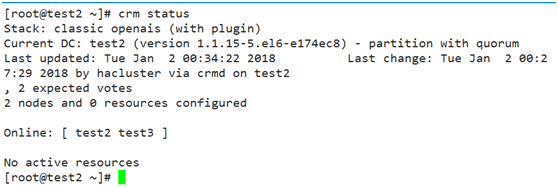
2个节点(test2、test3)在线,没有配置资源
配置集群:
[root@test2 ~]# crm configure
ERROR: CIB not supported: validator 'pacemaker-2.5', release '3.0.10'
ERROR: You may try the upgrade command
错误:版本过高,降低检验器版本:
[root@test2 ~]# cibadmin –modify –xml-text '<cib validate-with="pacemaker-1.2"/>'
再次进入配置:
[root@test2 ~]# crm configure
crm(live)configure#
1、查看当前集群:show
crm(live)configure# show
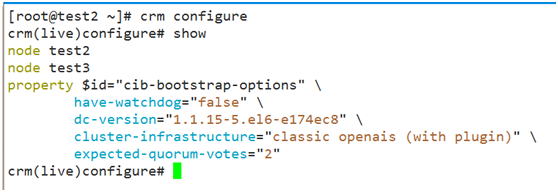
1.1、因为没有使用STONITH设置,所以禁止使用STONITH:
crm(live)configure# property stonith-enabled=false
crm(live)configure# commit
1.2、两节点集群,当一个节点宕机的时候,资源不会启动,所以设置no-quorum-policy的值为ignore,当一个节点宕机时资源还可以启动。
crm(live)configure# property no-quorum-policy=ignore
crm(live)configure# commit
2、资源配置
[root@test2 ~]# crm configure
2.1、配置webip:192.168.10.23
crm(live)configure# primitive webip ocf:heartbeat:IPaddr params ip=192.168.10.23 nic=eth0 cidr_netmask=24
crm(live)configure# verify
crm(live)configure# commit

2.2、配置web资源
crm(live)configure# primitive webserver lsb:httpd
crm(live)configure# commit

默认情况下,资源是平均分配的,如果所示:一个资源在test2,另一个在test3。
定义一个组资源,将ip和httpd服务添加进去
crm(live)configure# group webservice webip webserver
crm(live)configure# commit

浏览器打开:192.168.10.23
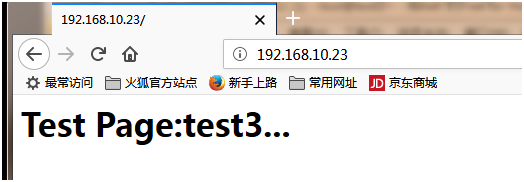
资源在test3节点上。
当test3节点下线,则资源转移到test2节点上
[root@test3 ~]# crm node standby
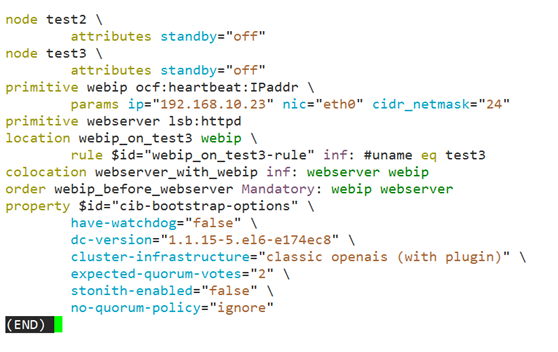
除了通过组资源来绑定资源在同一节点,还可以通过排列约束来实现。
crm(live)configure# colocation webserver_with_webip inf: webserver webip
crm(live)configure# commit
顺序约束:资源启动和关闭的顺序
先启动ip,再启动web服务
crm(live)configure# order webip_before_webserver Mandatory: webip webserver
crm(live)configure# commit
位置约束:资源对节点的倾向性
crm(live)configure# location webip_on_test3 webip rule inf: #uname eq test3
crm(live)configure# commit
资源倾向于test3节点。
设置资源对节点的粘性:
crm(live)configure# # property default-resource-stickiness=数值(默认0)
由于定义资源时没有设置监控功能,当集群启动后,如果把某资源kill,资源并不会转移到其他节点。所以定义资源时必须设置监控功能。
以下重新设置资源(重新设置之前,把已设置的资源停止后删除):
webip:
crm(live)configure# primitive webip ocf:heartbeat:IPaddr params ip=192.168.10.23 nic=eth0 cidr_netmask=24 op monitor interval=10s timeout=20s
crm(live)configure# verify
crm(live)configure# commit

webserver:
crm(live)configure# primitive webserver lsb:httpd op monitor interval=10s timeout=20s
crm(live)configure# verify
crm(live)configure# commit

组资源webservice:
crm(live)configure# group webservice webip webserver
crm(live)configure# verify
crm(live)configure# commit

nfs共享存储
继续实验前,将前面设置的组资源停止。
test1:192.168.10.161 CentOS6.9主机名:test1,提供nfs
test1:nfs共享目录为:/web/htdocs,此目录下的测试页为:index.html,内容:Page On NFS Server。
[root@test2 ~]# showmount -e 192.168.10.161
Export list for 192.168.10.161:
/web/htdocs 192.168.10.0/24
资源设置(test2,也可以在test3设置):
crm(live)configure# primitive webstore ocf:heartbeat:Filesystem params device="192.168.10.161:/web/htdocs" directory="/var/www/html" fstype="nfs" op monitor interval=20s timeout=40s op start timeout=60s op stop timeout=60s
crm(live)configure# verify
crm(live)configure# commit

将webstore资源添加到组webservice
crm(live)configure# edit
group webservice webip webstore webserver
然后保存退出
crm(live)configure# verify
crm(live)configure# commit
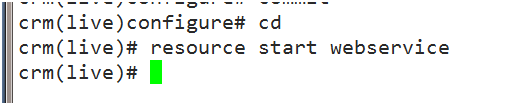
启动webservice组资源:
crm(live)configure# cd
crm(live)# resource start webservice
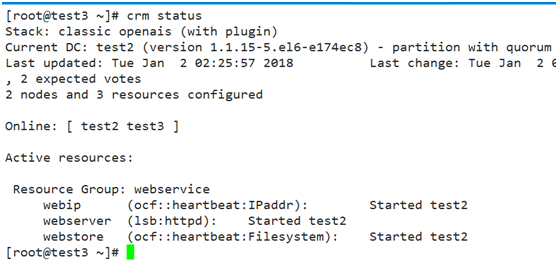
查看状态:
test2、test3设置SELinux:
[root@test2 ~]# setsebool -P httpd_use_nfs=1 ; ssh test3 'setsebool -P httpd_use_nfs=1'
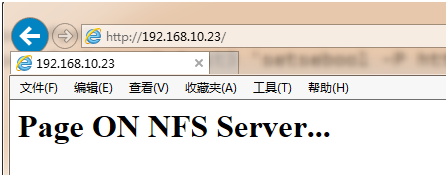
浏览器打开:192.168.10.23