RHEL 7: corosync v2 + pacemaker
node1: 192.168.10.201 主机名:node1.system.com
node2: 192.168.10.202 主机名:node2 system.com
node1、node2的/etc/hosts文件中添加:
192.168.10.201 node1.system.com node1
192.168.10.202 node2. system.com node2
1、node1、node2安装并启动pcsd服务
[root@node1 ~]# yum install pcs -y
[root@node1 ~]# systemctl start pcsd
[root@node1 ~]# systemctl enable pcsd
启动服务第二种方法:使用ansible,配置好ansible的hosts文件:
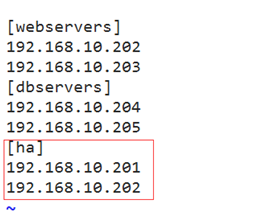
[root@node1 ~]# ansible ha -m service -a 'name=pcsd state=started enabled=yes'
设置密码:
[root@node1 ~]# echo 123456 | passwd –stdin hacluster
[root@node2 ~]# echo 123456 | passwd –stdin hacluster
或者:
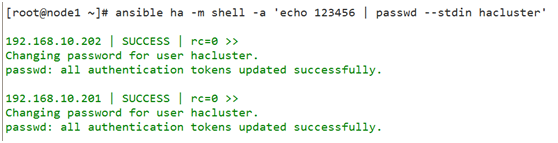
[root@node1 ~]# ansible ha -m shell -a 'echo 123456 | passwd –stdin hacluster'
2、node1或node2配置corosync
[root@node2 ~]# pcs cluster auth node1.system.com node2.system.com -u hacluster

[root@node2 ~]# pcs cluster setup –name mycluster node1.system.com node2.system.com
3、启动集群
[root@node2 ~]# pcs cluster start –all
node1.system.com: Starting Cluster…
node2.system.com: Starting Cluster…
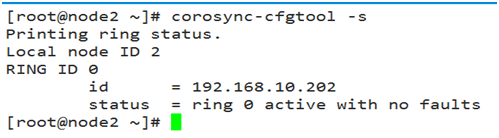
4、检查集群启动状态
[root@node2 ~]# corosync-cfgtool -s
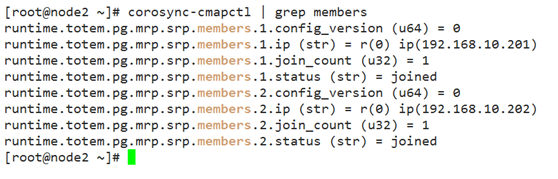
检查集群成员关系及Quorum API:
[root@node2 ~]# corosync-cmapctl | grep members
[root@node2 ~]# pcs status corosync
集群全局配置命令:pcs property,例如:
[root@node2 ~]# pcs property set stonith-enabled=false
显示配置情况:# crm_verify -L -V
5、crmsh配置高可用集群
5.1、到官网下载repo文件:
http://crmsh.github.io/download/#_centos_7
放到/etc/yum.repos.d目录中
安装crmsh: # yum install crmsh -y
后者自行下载python-pssh、pssh、crmsh三个rpm包安装。
5.2、查看集群状态:
[root@node2 ~]# crm status
5.3、交互式:crm
如果版本低:

解决方法:
[root@node2 ~]# cibadmin –modify –xml-text '<cib validate-with="pacemaker-1.2"/>'
5. 4、crmsh配置高可用集群
vip:192.168.10.160
node1:192.168.10.201 node2:192.168.10.202
1)、node1、node2安装好httpd服务
node1网页测试页:
# echo "<h1>node1.system.com</h1>" >/var/www/html/index.html
node2:网页测试页:
# echo "<h1>node2.system.com</h1>"> /var/www/html/index.html
httpd服务rhel 6不能设置开机启动,RHEL7要设开机启动
2)、crm配置集群vip、httpd
[root@node2 ~]# systemctl daemon-reload
[root@node2 ~]# crm
crm(live)# configure
crm(live)configure# primitive webip ocf:heartbeat:IPaddr params ip=192.168.10.160
校验一下看看有没出错:
crm(live)configure# verify
提交设置:
crm(live)configure# commit
定义web服务:
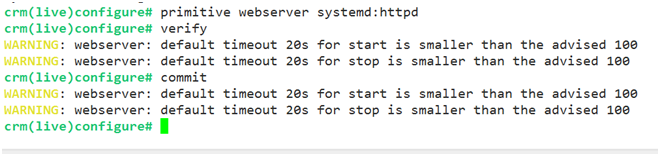
crm(live)configure# primitive webserver systemd:httpd
crm(live)configure# verify
WARNING: webserver: default timeout 20s for start is smaller than the advised 100
WARNING: webserver: default timeout 20s for stop is smaller than the advised 100
crm(live)configure# verify
crm(live)configure# commit
查看一下状态:
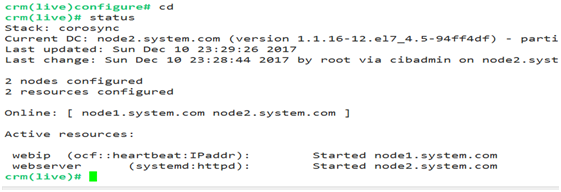
显然ip和httpd服务不在同一节点上。
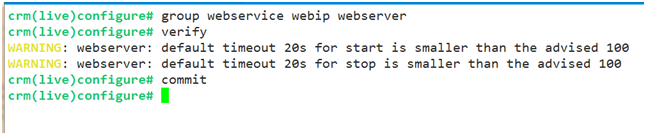
定义组资源,组名为webservice,使ip和httpd服务在同一节点上:
crm(live)configure# group webservice webip webserver
crm(live)configure# verify
crm(live)configure# commit
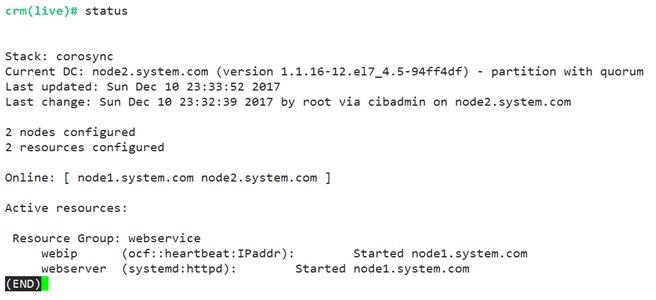
ip和httpd服务在同一节点上:
浏览器打开:192.168.10.160
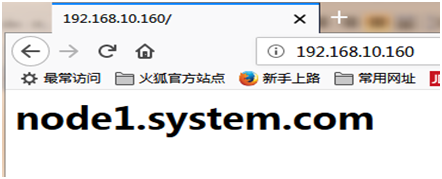
宕机测试:
手动设置某个节点为standby,则资源会自动转移至另外一个节点。
online命令设置节点上线。
node1节点下线:crm(live)node# standby
则资源自动转移到node2,浏览器打开:192.168.10.160
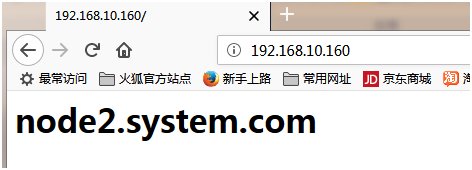
如果此时node2停止pacemaker 、corosync服务或者关机:
[root@node2 ~]# systemctl stop pacemaker corosync
则资源会转移到node1
crm(live)configure# property no-quorum-policy=ignore